
Florida Geological Survey - Data and Maps
Subsidence Incident Reports
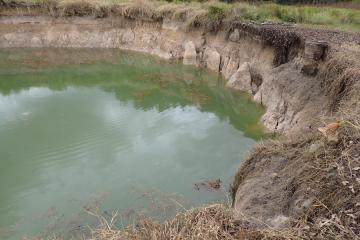
Sinkholes are closed depressions in areas underlain by soluble rock such
as limestone, dolostone, gypsum, or salt. Sinkholes form when
surface sediments subside into underground voids created by the
dissolving action of groundwater in the underlying bedrock.
Other subterranean events can cause holes, depressions or subsidence of the land surface that may mimic sinkhole activity. These include subsurface expansive clay or organic layers which compress as water is removed, collapsed or broken sewer and drain pipes or broken septic tanks, improperly compacted soil after excavation work, and even buried trash, logs and other debris.
Commonly, a reported depression is not verified by a licensed
professional geologist to be a true sinkhole, and the cause of subsidence is not known. Such
an event is called
a subsidence incident. The Florida Geological Survey maintains and
provides a downloadable database of reported subsidence incidents
statewide. While this
data may include some true sinkholes, the majority of the incidents have
not been field-checked and the cause of subsidence is not verified. |
Below you will find three different types of files.
One is an Excel Spreadsheet, the second is an
ESRI ArcGIS compatible shapefile, and the third is a
kmz overlay file for use
in Google Earth and similar mapping products. These
files provide subsidence incidents
reported to the Florida Geological Survey and
updated through May 6, 2013.
After clicking on any of the Subsidence Incident
Reports
links you will be taken to a page where you must
submit your e-mail address: your e-mail address is used only
to statistically track who is using the Subsidence Incident
Reports and will
not be used in any other way. After submitting your e-mail
address and before you can download the Subsidence Incident
Reports you will be
asked to read and agree to a disclaimer.
A Word Document
titled
"The FGS the FSRI, and Karst Data in Florida"
has been provided here for anyone interest in the
history of the Database and other subsidence
incident
publications.
Contact
Clint Kromhout
(clint.kromhout@dep.state.fl.us) with questions
|
Subsidence Incident Reports in a Microsoft Excel Spreadsheet
- Download the database spreadsheet
here (SubsidenceIncidentReports_2013may6.xlsx - size:
1.8MB)
- Use this
word document (SIRs_fieldnames.doc)
to help with identifying the fields in the
Subsidence Incident Reports file.
Subsidence Incident Reports in an Arcview shapefile
This file is to be used with any geographic
information system software that can use ESRI ArcGIS
shapefiles. A FREE reader for shapefiles is available at
http://www.esri.com/software/arcgis/explorer
This file would be most beneficial to anyone familiar
with ESRI Arcview Software since only the shape file and
database for the Subsidence Incident Report locations have been provided.
During the download process, you may be prompted for
a file download destination.
Be sure
to point the download to a locatable folder on your computer.
Download the zipped shapefiles (SubsidenceIncidentReports_2013May6_shapefile.zip -
size: 1.9Mb) here.
To extract files after download:
- Find the file on your computer; (SubsidenceIncidentReports_2013May6_shapefile.zip)
- Double click on the file. With many unzip
programs you will be asked
where you would like to extract the files.
Choose an existing folder or create a new
one in which to place the file.
Subsidence Incident Report locations in a KMZ file
This file is to be used with
popular mapping software such as Google Earth. Google Earth is available as a free download at
http://www.google.com/earth/download/ge/agree.html
Once Google Earth is installed, loading the kmz file as
a layer will plot the locations of the subsidence
incidents in the FGS database as yellow dots, labeled
with the FGS incident reference numbers. Users may
cross reference the incident numbers to the Excel spreadsheet
(downloadable above) for further
information about each incident.
During the download process, you may be prompted for
a file download ("save as") destination.
Be sure
to point the download to a locatable folder on your computer.
Download the kmz file (SubsidenceIncidentReports_2013May6.kmz
- size: 693Kb)
here
How to use with Google Earth:
- Install the Google Earth software.
- Download the kmz file to a locatable folder
on your computer (use the "save" option when
prompted).
- Start Google Earth.
- Once Google earth is
running, open Windows Explorer and double click on the KMZ file
saved in your computer. It
will automatically load into Google Earth.
The subsidence incidents will appear as a new layer in the list of
layers - make sure the box beside its name
is checked. Yellow dots will appear in the
state of Florida. Zoom in to Florida to
view the incident locations. Users may
type a specific street address into Google
Earth's address window to view subsidence
incidents adjacent to that address. If you wish to have future
access to the layer, be sure to save it when prompted
upon closing Google Earth.
• For assistance with file download problems
please contact Frank Rupert, FGS Web
Administrator, at frank.rupert@dep.state.fl.us.
The Florida Geological Survey does not receive support or
funding from or collaborate with external software or business websites. Links
are provided for informational purposes only. The end-user takes on all
risk associated by entering said web sites.
Notes:
The Florida Geological Survey Arcview shapefile formats are
projected using a DEP modified ALBERS projection.
The ArcView and ArcMap projection data is available
at: http://www.dep.state.fl.us/gis/projdata.htm.
For
further assistance on GIS information available
through the FGS please contact,
Jim Cichon
james.cichon@dep.state.fl.us,
ph. 850-617-0335)
|
Last updated:
May 13, 2013